 rekall
Closed beta — you're invited
You already know the right people.
Rekall remembers who they are, what you promised, and who to call when you need something specific.
No pipeline, no deals — these are relationships.
What you've done with them, not who exists.
Nothing public, no one's notified.
What it really replaces — your spreadsheet, your inbox search, and the notes you lose.
It's not a CRM you have to feed. It remembers for you.
You lose the thread.
You talk to different people all the time — email, WhatsApp, meetings, DMs. You can't keep track of what you said, what you promised, when you last spoke. So you dig through your inbox to reconstruct it. Or you don't — and something slips.
The follow-up you forgot is the deal that went to someone who remembered.
The product
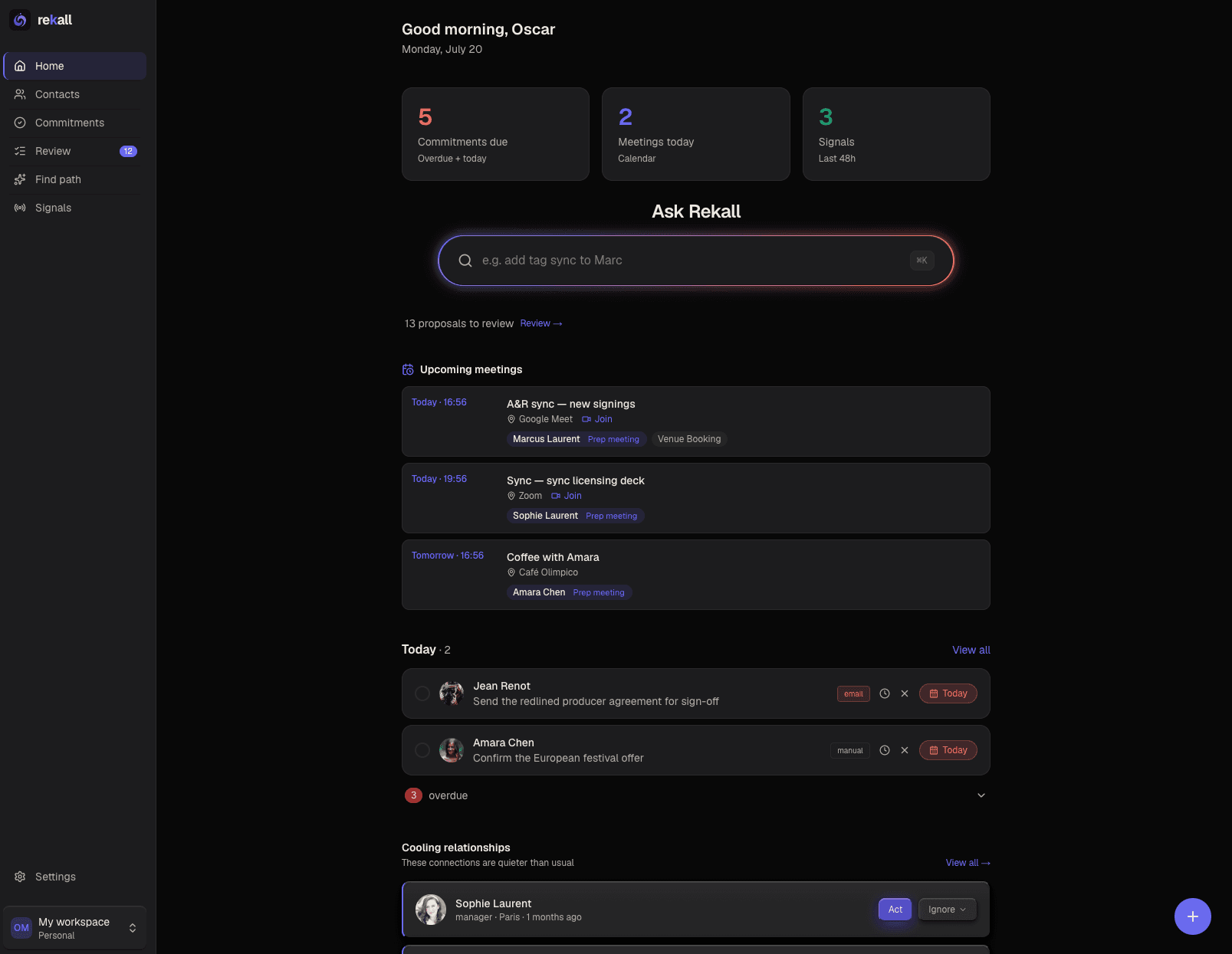
Connect your inbox. Three minutes. Your network appears.
02 — What it does
Rekall is the memory layer under all of it.
Connects to your inbox and builds your relationship memory on its own. No manual entry.
Every night, it fills in what it doesn't know. You approve.
Find anyone, brief before a meeting, draft the follow-up.
It remembers for you — and finds what you didn't know to look for.
Three layers, all live.
It reads your inbox
Contacts and promises, pulled from three months of email.
Every conversation, every channel, one place. Email, WhatsApp, meetings, notes, voice memos — all against one contact, in order. Walk into any interaction knowing exactly where you left off.
Connect your inbox and Rekall reads the last three months. Out of that: your real contacts, and the commitments buried in those threads — the thing you promised on a Tuesday and forgot by Thursday. Overdue ones don't let you forget. Each contact gets a full timeline across every channel.
Four ways in, one memory. You can also capture on the fly: a voice note after a meeting, a photo of a business card, a PDF, a scribbled note. Rekall structures it and files it against the right person.
It enriches itself, nightly
Role, company, city — found and proposed, never written without you.
Every night, Rekall goes looking for what it doesn't know about your contacts:
Web search — role, company, city, socials. Anchored on the company so it can't confuse your Brian Smith with another one.
Wikipedia — for the notables in your network, who surface on their own.
Genius — on demand, for creatives. You pick the right artist from the results; Rekall doesn't guess.
Wrong is worse than none. If Rekall isn't sure it's the right person, it says nothing.
And nothing is ever written without you: everything lands as a suggestion you approve, correct, or dismiss. Dismiss one and it never comes back.
Find Path
Search your network in plain language, ranked by warmth.
Find Path — search your network in plain language. "Radio in Canada." "A lawyer in LA." Results come back ranked by how warm the relationship actually is, not alphabetically. Close, warm, dormant — based on real data, never invented.
Links to other workspaces widen the search — the full story is its own section below.
Not who exists. Who you can reach.
It preps, you send
Meeting briefs and drafts from your real history. No send button, by design.
Pre-meeting brief — one click before a meeting: open commitments, recent conversations, talking points, what to watch for. If the history is thin, it says so rather than making something up.
Draft messages — Rekall writes the follow-up using your real history. No invented facts. It prepares; you send. There's no send button, by design.
Record a thought leaving a meeting, snap a business card, forward a message — Rekall transcribes it, extracts the commitments, and files it against the right person.
The conversations where the real business happens are on the phone. Record them with whatever you already use — a Plaud, your voice memos — and drop the file in: Rekall transcribes it, pulls out the commitments, and files it against the right person. Automatic call capture is next on the roadmap.
03 — Your network
Unleash the power of your network.
Alone you reach far. Connected, further.
Your reach was never just your own contacts. It's your network, your team's, your trusted partners' — combined. Rekall makes that real: link workspaces, and Find Path searches across all of it. Ask in plain language — ‘a distributor in Toronto,’ ‘a lawyer in LA’ — and it answers from your actual relationships, and those of the people you trust — ranked by how warm each one really is. Not who exists. Who your circle can actually reach.
Your network
Everything you've built — every contact, every conversation, every promise. Private by default: nothing is shared, nothing is discoverable. Ever.
Your team's network
One shared workspace. Everyone's relationships become searchable by everyone — and you still choose what's shared and what stays yours. When someone leaves, the intelligence stays.
Your trusted circle
Link workspaces with partners, collaborators, friends. Their network becomes searchable — a title, a company, never the name — and the intro goes through them. Every link makes both sides stronger.
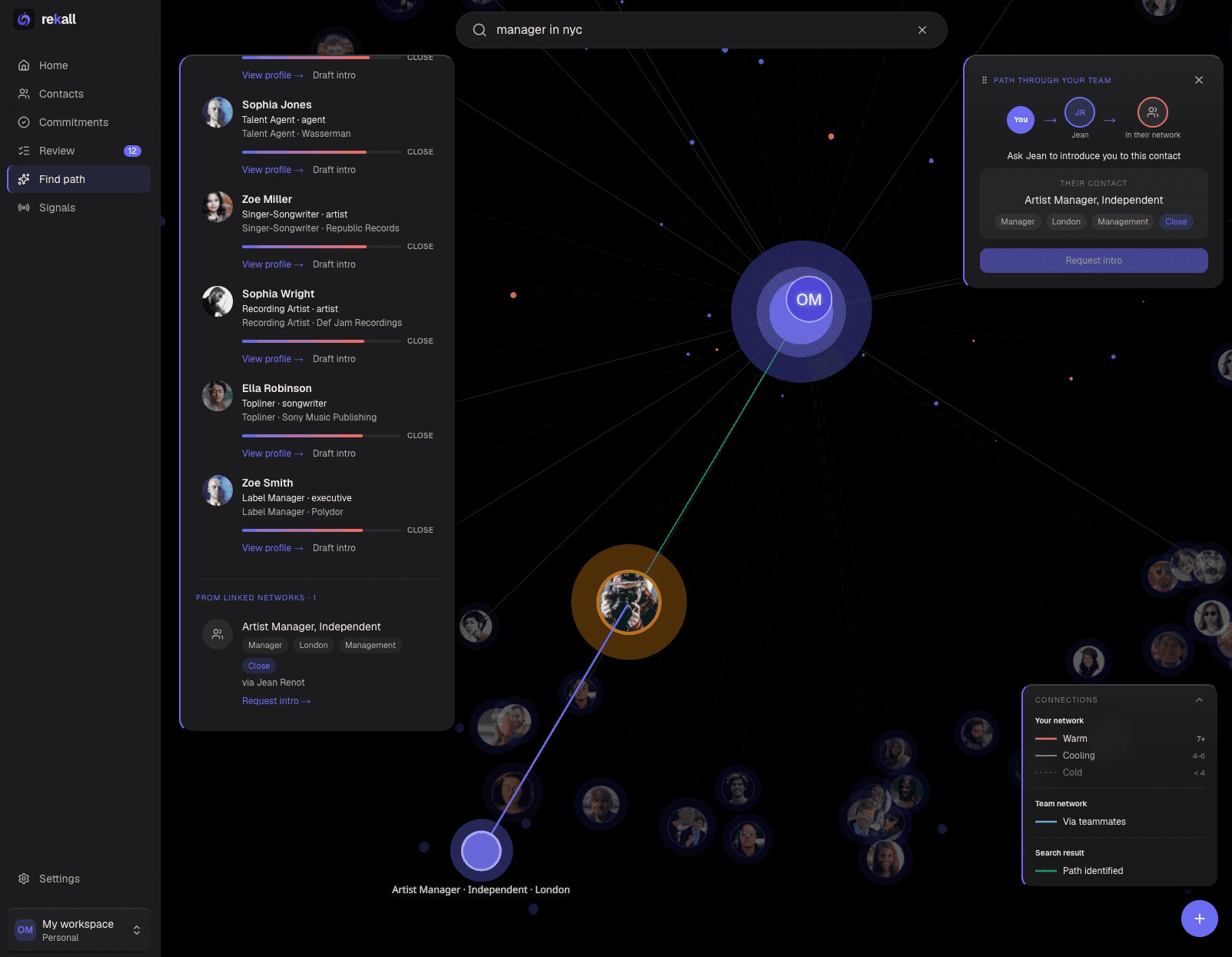
Find Path — your network and the networks you trust, ranked by warmth
Your network is bigger than you think. Rekall is how you reach all of it.
You see a door exists. They decide if it opens.
04 — Why you
Ten people. Onboarded personally.
Free during beta.
It's free. You'll hit rough edges — I'll tell you what they are, not hide them.
What you tell me is what gets built next.
I onboard each person myself.
Rekall is built for one kind of person: an independent in music who does real business development, whose network grows faster than their memory, and who decides on their own tools. Managers, agents, small labels, indie publishers. Not enterprise teams, not people who need three approvals to try something.
That's not marketing positioning. It's the profile the product was built against, from real users.
The beta is ten people. Not for scarcity — because I onboard each one personally, and because at this stage, the feedback of ten people who actually use it is worth more than a thousand signups who don't.
You'll hit things that are rough. They're documented below, not hidden.
What you tell me changes the product. The features you'd want next are the ones getting built next.
It's free during beta. Pricing is a conversation for later, not a surprise.
What I need back: tell me what breaks, what's wrong, and what you expected that wasn't there. Especially the small friction — the thing you'd normally shrug off is exactly what I can't see from the inside.
05 — Getting started
Getting started — step by step
From the link to your network on screen, in about five minutes.
- 1
Read this page
You're doing it. It covers everything below — especially step 3, the one that trips people up.
- 2
Go to rekall.one and sign in
Sign in with Google or Microsoft — whichever account holds the inbox you want Rekall to read.
- 3
Get past the "unverified app" screen
This is the one moment people hesitate. Here's why it's fine.
If you signed in with Google, you'll see a warning: "Google hasn't verified this app." That's expected — Rekall is in Google's verification queue, not flagged as unsafe. Click Advanced at the bottom left, then Go to rekall.one. Microsoft accounts won't show this.
- 4
Approve inbox access
Rekall asks to read your email. This is the part that makes people pause — so, plainly: your emails are never stored. Rekall reads them, extracts the intelligence, and deletes the raw content immediately. Nothing is kept, nothing is readable after the fact.
- 5
Name your workspace
Call it after your business. It's yours alone — nothing in it is shared or discoverable by default.
- 6
Connect your inbox and run the scan
Rekall reads the last three months. This takes about three minutes — the one bit of waiting in the whole process. Let it run.
- 7
Watch your network appear
Your real contacts materialize, with the commitments pulled out of your threads — the promises buried in emails you'd forgotten. This is the moment it clicks. If it worked, you'll feel it here.
- 8
Optional: connect your calendar
Google or Outlook. Your meetings land on your home page, each with a one-click brief. Thirty seconds, and it never touches your mail access.
06 — What to expect
Four things that will happen. None are bugs.
Google expires the connection every 7 days while an app is unverified. This doesn't affect Microsoft accounts.
Hit Sync now for fresh email; nightly enrichment runs on its own.
Overnight enrichment lands as a stack of suggestions.
Nothing is written to your contacts without a yes.
And one honest note: during the beta, I watch how the product gets used — with an analytics tool — so I can fix what's rough. None of your content is part of that: your emails and contacts stay invisible to it. Just your interactions with the interface — where you click, where you get stuck.
Weeks later, got a reminder about a contact he'd completely lost track of. He reached out just before the deadline — and closed an interview for his client.
"If you signed in with Google, you'll reconnect about once a week."
Google expires the connection every 7 days while an app is unverified. This doesn't affect Microsoft accounts. When your inbox stops syncing, reconnect in Settings — ten seconds. This disappears when verification clears.
"Your inbox syncs when you tell it to."
Rekall doesn't watch your inbox in the background. When you want fresh email in, hit Sync now in Settings — it picks up where the last scan left off, and takes a minute, not three. What IS automatic: every night, Rekall enriches and cross-matches whatever it knows. New contact today, enriched by tomorrow morning. Automatic sync is coming; for now, syncing is a button.
"The morning after your first scan, your Review page will be full."
Overnight, Rekall enriches every contact it just met and matches them across your network. That lands as a stack of suggestions. It looks like a lot because it is. Work through it in batches, or leave it for a week — nothing expires, nothing breaks.
"Rekall proposes. You approve."
Nothing is written to your contacts without you saying yes. You can correct a suggested value before approving it. Get it wrong once and it won't ask twice.
Your emails are never stored.
Rekall reads a message, extracts the intelligence — who, what was said, what was promised — and destroys the raw content immediately. Nothing kept, nothing logged, nothing readable after the fact. Not by me. Not by anyone.
This is architecture, not policy. The content never lands in a database. It's the core promise of the product, and it's why the rest of it is trustworthy.
Forward any message, voice note, or business card photo to a Rekall number; it files itself against the right contact.
The conversations where the real business happens. Record with a Plaud or your phone; the call lands in the right contact's memory — transcribed, commitments extracted.
Someone changes jobs, lands a credit, gets press. Rekall tells you when a dormant contact just became relevant.
Zoom, Slack — every conversation feeding the same memory.
None of this ships to a waitlist. It ships to the ten people using it — shaped by what they ask for.
You already know the right people. Rekall remembers everything you said, promised, and tells you who to call.
Questions you'll probably have.
Why does Google say the app is "unverified"?
Rekall is in Google's verification queue — standard for any new app requesting email access. The warning doesn't mean unsafe; it means the review isn't finished. Click Advanced, then "Go to rekall.one", and approve the permission. This screen disappears once verification clears.
Why do I have to reconnect every week?
If you signed in with a Google account: Google expires the connection every 7 days while an app is under verification. When your inbox stops syncing, reconnect in Settings — ten seconds. Temporary, and gone once verification clears. Microsoft accounts aren't affected.
Can I connect more than one email account?
Yes — as many as you need, Gmail or Outlook. If you run more than one business, connect both inboxes and Rekall builds one memory across them. During the beta I add each address manually on my end, so send me the ones you want and I'll set them up.
What does Rekall read during the beta?
Your email, going back three months, plus public web sources for enrichment. That's the core of the beta and it's where the value is right now.
WhatsApp capture is built and works, but the production number is still in Meta's verification queue — until it clears, using it means re-authorizing every few days. I'd rather you skip it than fight it.
And a heads-up on the demo: Signals (job changes, press, new credits) and Cooling relationships are shown in the public demo but aren't live in your account yet. They're next on the build list. Everything else you saw is real.
Where does Rekall fit in my day?
Open it first. Before your inbox, before WhatsApp — because it's the only place where all of it has already been pulled together.
Your morning view: what you promised and haven't delivered, what's overdue, who you're meeting today and what you need to know before walking in, and whatever Rekall enriched overnight. No reconstructing, no digging across four apps to figure out where things stand.
It doesn't replace your inbox — you'll still answer email in your inbox. It replaces the ten minutes you spend every morning trying to remember where you left off.
What happens after my first scan?
The morning after, your Review page will be full. Overnight, Rekall enriches every contact it just met — role, company, city, socials — and it all lands as suggestions. It looks like a lot because it is. Work through it in batches, or leave it for a week: nothing expires, nothing breaks.
Does Rekall store my emails?
No. Rekall reads a message, extracts the intelligence — who, what was said, what was promised — and destroys the raw content immediately. Nothing kept, nothing logged, nothing readable after the fact. This is architecture, not policy: the content never lands in a database.
Can Rekall — or anyone who runs it — read my emails?
No. Email content is never stored, so there is nothing to read back. Not by the team behind Rekall, not by anyone.
How it actually works: your workspace is isolated from every other workspace, and its contents aren't accessed by the people operating the platform. The extraction runs on Claude, Anthropic's AI, under commercial API terms — your content isn't used to train models and isn't retained long-term. Anthropic's models are used by governments and major institutions. Rekall operates under Canadian privacy law (Law 25 / PIPEDA).
And this shouldn't rest on trust alone: bringing in formal security and governance review is a priority as the product grows, so that this answer stops depending on anyone's word.
Do you track how I use Rekall?
During the beta, yes — with a privacy-first analytics tool (PostHog), so I can see what's rough and fix it. It records your interactions with the interface — which screens you open, where you click, where you get stuck — never your content. Your contacts, emails, commitments, and searches stay invisible to it: no names, no addresses, no message text, and no search text ever leaves for analytics.
Session replays are fully masked — every piece of on-screen text is blanked out, so a replay shows structure and clicks, never a single contact. This runs only inside the app, never on the public demo, and it's beta-only: it exists to shape the product with real usage.
Can I use my work email?
Only if your organization allows it. Most corporate policies restrict sharing contact data with third-party tools — check before connecting, or use a personal address or one from your own company. I don't use my own work email on Rekall, for exactly that reason.
In a shared workspace, what does my team actually see?
Always private to you — your conversations, your notes on what was said, and your commitments. Nobody on your team can see them. What you discussed with someone and what you promised stays yours.
Visible to the team — the contacts themselves and everything attached to them: role, company, city, socials, tags, team notes, and any intel added or enriched. This is the point of a shared workspace: a teammate opening a contact sees who this person is and what the team knows — never your history with them.
Worth being precise: contact intelligence is team-visible as soon as it exists, including enrichment suggestions still waiting in Review. Approving one applies it to the contact — it doesn't make it visible, it already was.
When someone leaves the team, the contacts and the intelligence stay in the workspace. Their conversations and commitments stay private and go with them.
What if Rekall gets something wrong about a contact?
Nothing is written without your approval. Every suggestion can be approved, corrected before approving, or dismissed — and a dismissed suggestion never comes back. If something wrong slips through anyway, tell me: "wrong is worse than none" is a design rule here.
And if you'd rather Rekall didn't look things up at all, you can turn enrichment off entirely — one toggle in Settings, and it stops searching the web, Wikipedia, and Genius. Your existing data stays untouched.
Can Rekall send messages to my contacts?
Never. Rekall drafts; you send. There is no send button anywhere, by design. Your contacts are never notified of anything — not that they were added, not that they were enriched, nothing.
What's the difference between adding a team member and linking a workspace?
Two different gestures. Adding a team member brings someone into YOUR workspace: you work in one shared space, with a shared pool of contacts. Linking a workspace connects two separate businesses: each keeps its own space and contacts, and Find Path can search across the bridge — surfacing only a title and a company, never the name. One is "we work together." The other is "we trust each other, and our networks can talk."
Can I connect LinkedIn, Instagram, or Facebook?
Not directly during the beta. But you can export your connections from any of them and import the file — Rekall cross-references it against the contacts it found in your email and proposes matches. Web enrichment also finds public profiles on its own.
What does the beta cost?
Nothing. The beta is free. Pricing comes later, and it'll be a conversation before it's ever a charge — no surprises.
When does Rekall launch?
The plan: about two months of closed beta with ten users, shaping the product with real feedback. Then the official launch. Timelines in beta move — but that's the path.
I found a bug, something feels off, or something should just be better — what do I do?
Keep a running note during the week — bugs, friction, things that annoyed you, things you wished existed. Once a week, send it all in one email with the subject QA REKALL [week #]. Format inside doesn't matter: bullet points, screenshots, a voice note transcript, whatever's fastest.
And if something simply should be better — not broken, just clumsy — I want that too. The small stuff you'd normally shrug off is exactly what I can't see from the inside. Poke holes. Nothing here is taken personally.
Does Rekall watch my inbox in the background?
No — syncing is a button during the beta. Hit Sync now in Settings when you want fresh email in; it picks up where the last scan left off and takes about a minute. What does run on its own: nightly enrichment. A contact captured today is enriched and cross-matched by tomorrow morning. Automatic sync is coming.
Can I control what Rekall enriches?
Yes — completely. Enrichment is on by default, and you're shown exactly what that means when you connect your inbox. One toggle in Settings → Privacy turns it off: no web search, no Wikipedia, no Genius, nothing looked up from outside. What stays on either way is matching your own data to itself — like cross-referencing a LinkedIn export you uploaded against your contacts. That's your data, not an outside source.